
jquery2015-07-15 23:12:51 6087
做了一个类似于阿里云弹性计算中的滑块效果,可以自由滑动滑块,并且计算刻度。
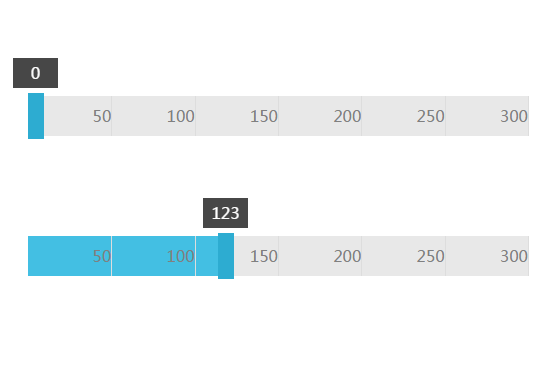
Jq代码:
<script type="text/javascript">
$(function(){ScrollerTrack.Init();});
var ScrollerTrack={
	BodyWidth:500,
	MaxValue:300,
	CurrentX:0,
	CurrentValue:0,
	Count:0,
	Init:function(){
		var mWidth=ScrollerTrack.BodyWidth;
		$(".contain").css("width",mWidth+"px");
		var count=ScrollerTrack.MaxValue/50;
		ScrollerTrack.Count=count;
		var itemWidth=mWidth/count;
		for(var i=0;i<count;i++){
			var span=$("<span>"+(i+1)*50+"</span>");
			$(span).css("width",itemWidth+"px").css("margin-left",i*itemWidth+"px");
			$(".value").append(span);
		}
		ScrollerTrack.Value();
	},
	Value:function(){
		 var currentValue;
		 var isMoving=false;
		 ScrollerTrack.CurrentX=$(".track").offset().left;
		 $(".track").mousedown(function() {
			 var target=$(this).parent();
			 isMoving=true;
			 $("html,body").mousemove(function(event) {
				 if(isMoving==false)return;
				 var changeX = event.clientX - ScrollerTrack.CurrentX;
                 currentValue = changeX - ScrollerTrack.CurrentX;
				 if(changeX<=0){
				 $(target).find(".track").css("margin-left", "0px");
				 $(target).find(".valueC").css("width", "0px");
				 $(target).find(".show").css("margin-left", "-15px");
				 $(target).find(".show").html(0);
				 ScrollerTrack.CurrentValue=0;
				 }
				 else if(changeX>=ScrollerTrack.BodyWidth-16){
				 $(target).find(".track").css("margin-left", ScrollerTrack.BodyWidth-16+"px");
				 $(target).find(".valueC").css("width",ScrollerTrack.BodyWidth-16+"px");
				 $(target).find(".show").css("margin-left", ScrollerTrack.BodyWidth-31+"px");
				 $(target).find(".show").html(ScrollerTrack.MaxValue);
				 ScrollerTrack.CurrentValue=ScrollerTrack.MaxValue;
				 }
				 else{
				 $(target).find(".track").css("margin-left", changeX+"px");
				 $(target).find(".valueC").css("width", changeX+"px");
				 $(target).find(".show").css("margin-left", changeX-15+"px");
				 var v=ScrollerTrack.MaxValue*((changeX+16)/ScrollerTrack.BodyWidth);
				 $(target).find(".show").html(parseInt(v));
				 ScrollerTrack.CurrentValue=parseInt(v);
				 }
			 });
		 });
		  $("html,body").mouseup(function() {
			isMoving=false;
		 });
	}
}
</script>彭亚欧个人博客原创文章,转载请注明出处
文章关键词:Jq弹性滑动,Jq刻度滑动,阿里云弹性计算滑动块实现
文章固定链接:https://www.pengyaou.com/legendsz/front/codejq/MTE4.html
上一篇 Jq字母自适应瀑布流
下一篇 SQL存储过程之分页